Single-Phase Pore-Scale Model (lbpm_permeability_simulator)
The LBPM single fluid model is implemented by a multi-relaxation time (MRT) collision model in a D3Q19 lattice representation of lattice Boltzmann equation (LBE) to solve the fluid momentum transport, recovering the Navier-Stokes equations. Beside the MRT scheme a set two-relaxation time (TRT) is used to avoid half-way bounce-back slip effects [1]. The implemented modeling is used to assess the permeability of digital rock images in either the Darcy or non-Darcy flow regimes.
LBM Formulation
Click here to open: LBM Formulation
The LBE governing momentum transport is defined based on a MRT scheme based on the D3Q19 discrete velocity set:
where \(\boldsymbol{F}\) is an external body force, \(c_s^2 = 1/3\) is the speed of sound and \(\boldsymbol{\xi}_q\) are the unit lattice vectors for the Lattice discretization:
The moments defined in the Gram–Schmidt basis are linearly independent functions of the distribution functions:
and the non-conserved equilibrium moments are then obtained following the moment-based approach proposed by d'Humières [2], in which selected equilibrium moments are explicitly enforced:
The relaxation parameters are determined based on the relaxation time \(\tau\):
where \(\tau\) is related to the kinematic viscosity of the fluid by \(\nu = (\tau - 1/2)/3\). The relation imposed on the even relaxation times enforces the no-slip velocity condition exactly at a position one-half lattice spacing from the solid boundary. Consequently, it leads to a viscosity-independent numerical error in the permeability estimate [3].
Run lbpm_permeability_simulator
A typical command to launch the LBPM single-phase simulator is as follows
`
mpirun -np $NUMPROCS lbpm_permeability_simulator input.db
`
where $NUMPROCS is the number of MPI processors to be used and input.db is
the name of the input database that provides the simulation parameters.
Note that the specific syntax to launch MPI tasks may vary depending on your system.
For additional details please refer to your local system documentation.
Model parameters
The essential model parameters for the single-phase MRT model are
tau– control the fluid viscosity – \(0.5 < \tau < \infty\)
The kinematic viscosity in LBM scale is given by
Numerical simulations may become unstable for values of \(\tau\) close to 0.5, corresponding to vanishing viscosity. The stability range of \(\tau\) is investigated in the benchmark tests Body-Centered Cubic. Additionally, the parameters governing fluid flow through the medium depend on the selected boundary condition, as discussed in the Boundary Conditions section below.
Boundary Conditions
The following external boundary conditions are supported by lbpm_permeability_simulator
and can be set by setting the BC key values in the Domain section of the
input file database
BC = 0– fully periodic boundary conditionsBC = 3– constant pressure boundary conditionBC = 4– constant volumetric flux boundary condition
For BC = 0 any mass that exits on one side of the domain will re-enter at the other
side. If the pore-structure for the image is tight, the mismatch between the inlet and
outlet can artificially reduce the permeability of the sample due to the blockage of
flow pathways at the boundary. LBPM includes an internal utility that will reduce the impact
of the boundary mismatch by eroding the solid labels within the inlet and outlet layers over \(z\)-coordinate
(https://doi.org/10.1007/s10596-020-10028-9) to create a mixing layer.
The number mixing layers to use can be set using the key values in the Domain section
of the input database
InletLayers = 0, 0, 10\((x, y, z)\) – set the number of mixing layers to10at the inlet over \(z\)-coordinateOUtletLayers = 0, 0, 10\((x, y, z)\) – set the number of mixing layers to10at the outlet over \(z\)-coordinate
To illustrate the mixing layers scheme imposed by InletLayers and OutletLayers in fully periodic domains, a tortuous square-channel geometry
is used as an example. In this geometry, the pore regions at the inlet and outlet only partially match. Two scenarios are considered in the
fluid-flow simulation. In the first case, the mixing layers scheme is not applied. As a result, a constricted region is observed at the periodic
boundaries, where the flow must adapt to the pore mismatch (Fig. 1). In the second case, the mixing layers scheme is applied using InletLayers = 0, 0, 10
and OutletLayers = 0, 0, 10. In this case, an increase in the pore area is observed at the inlet and outlet boundaries due to pore matching,
reducing the restriction imposed on the fluid flow (Fig. 2).
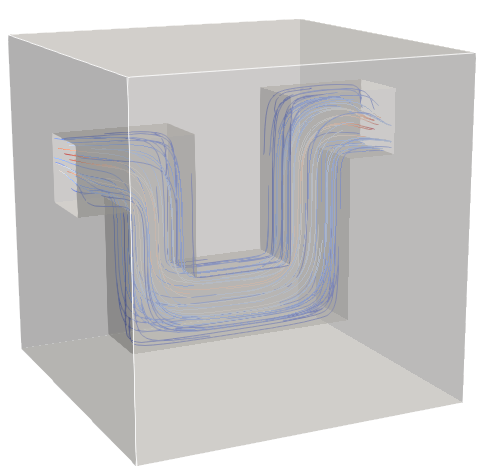
Fig. 1 - mixing layers not applied¶ |
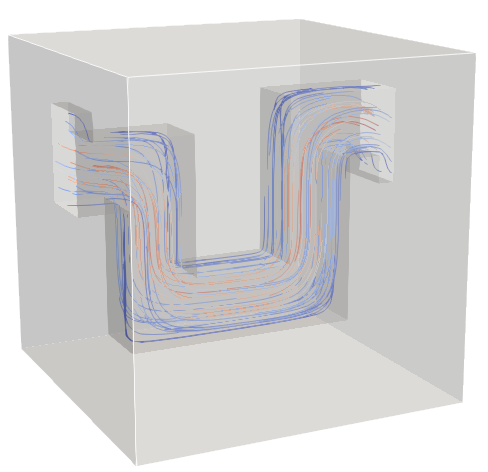
Fig. 2 - mixing layers applied¶ |
To observe the application of mixing layers scheme in 3D Digital Rocks and its impact in absolute permeability results see XXXXX 3D-DigitalRocks.
In scenarios where there is no match between inlet and outlet pores (Fig. 3), the fluid through the domain will not be allowed using BC = 0. In this case we
recommend apply a mirroring of the image, as illustrate Fig. 4. This procees duplicate the computational cost, but it ensure the pore conectivity and
accuracy for the permeability values. Is also available as function the introduction of layers based in a checkboard geometry as a alternative, for details
of this checkboard function see Domain Decomposition (lbpm_serial_decomp).
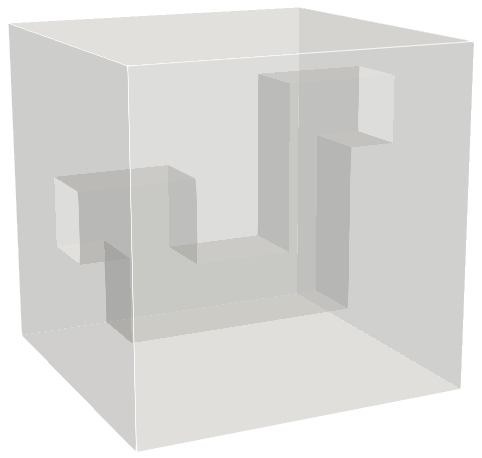
Fig. 3 - no match through inlet-outlet pore area¶ |
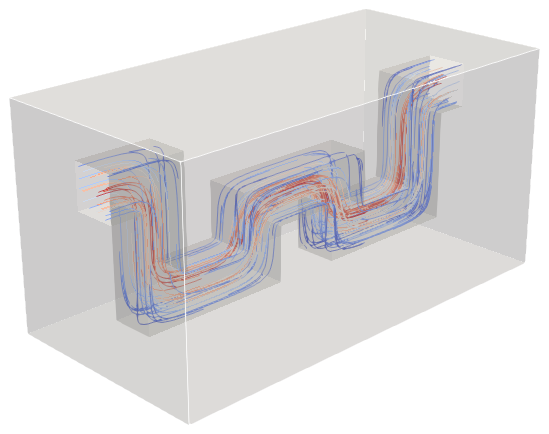
Fig. 4 - simetric-domain (perfect pore match)¶ |
Input File Example for BC = 0
MRT {
   tau = 1.0
   F = 0.0, 0.0, 1.0e-5
   timestepMax = 2000
   tolerance = 0.01
}
Domain {
   Filename = "Bentheimer_LB_sim_intermediate_oil_wet_Sw_0p37.raw"
   ReadType = "8bit"      // data type
   N = 900, 900, 1600     // size of original image
   nproc = 2, 2, 2        // process grid
   n = 200, 200, 200      // sub-domain size
   offset = 300, 300, 300 // offset to read sub-domain
   voxel_length = 1.66    // voxel length (in microns)
   ReadValues = 0, 1, 2   // labels within the original image
   WriteValues = 0, 1, 2  // associated labels to be used by LBPM
   InletLayers = 0, 0, 10 // specify 10 layers along the z-inlet
   OutletLayers = 0, 0, 10 // specify 10 layers along the z-outlet
   BC = 0                 // boundary condition type (0 for periodic)
}
Visualization {
}
Assessing Steady State Permeability
The previous section of the tutorial covered the approach to measure steady-state permeability. We now consider how to assess
the simulation has achieved this objective. For example, suppose that we choose tolerance = 0.01 – is this sufficient to
produce a satisfactory measurement? To determine this, we must examine the time history for the simulation and understand how
the simulation approaches a steady-state.
LBPM is equipped with fairly sophisticated capabilities for in situ analysis. This means that as a simulation is performed,
LBPM continuously analyzes the simulation results to obtain averaged measures that capture how the flow evolves. For
lbpm_permeability_simulator the simulation is analyzed every 1000 timesteps, and the time history for averaged measures is
logged to the spaced-delimited CSV file Permeability.csv. Effectively all spreadsheet and plotting software packages can import
CSV files so that results can be visualized using any tool that you prefer. In my case, I often prefer to use R. In this tutorial,
we will use python.
We can plot how the time history:
import required modules
import pandas as pd
import numpy as np
from matplotlib import pyplot
read the CSV data
D=pd.read_csv("Permeability.csv",sep=" ")
3. Note that the original image includes the entire cylindrical core, meaning the the permeability will be under-estimated since the true porosity should only include the region inside the cylinder. Furthermore units reported by LBPM are in square microns. We can convert this to milliDarcy by rescaling:
CylinderRatio=0.7853982
UnitConversion=1013
K=D['k']*UnitConversion/CylinderRatio
Then we plot and visualize the data
pyplot.figure()
pyplot.plot(D['time'],K)
pyplot.xlabel('time')
pyplot.ylabel('permeability (millidarcy))')
pyplot.show()
The resulting plot match what is shown below:
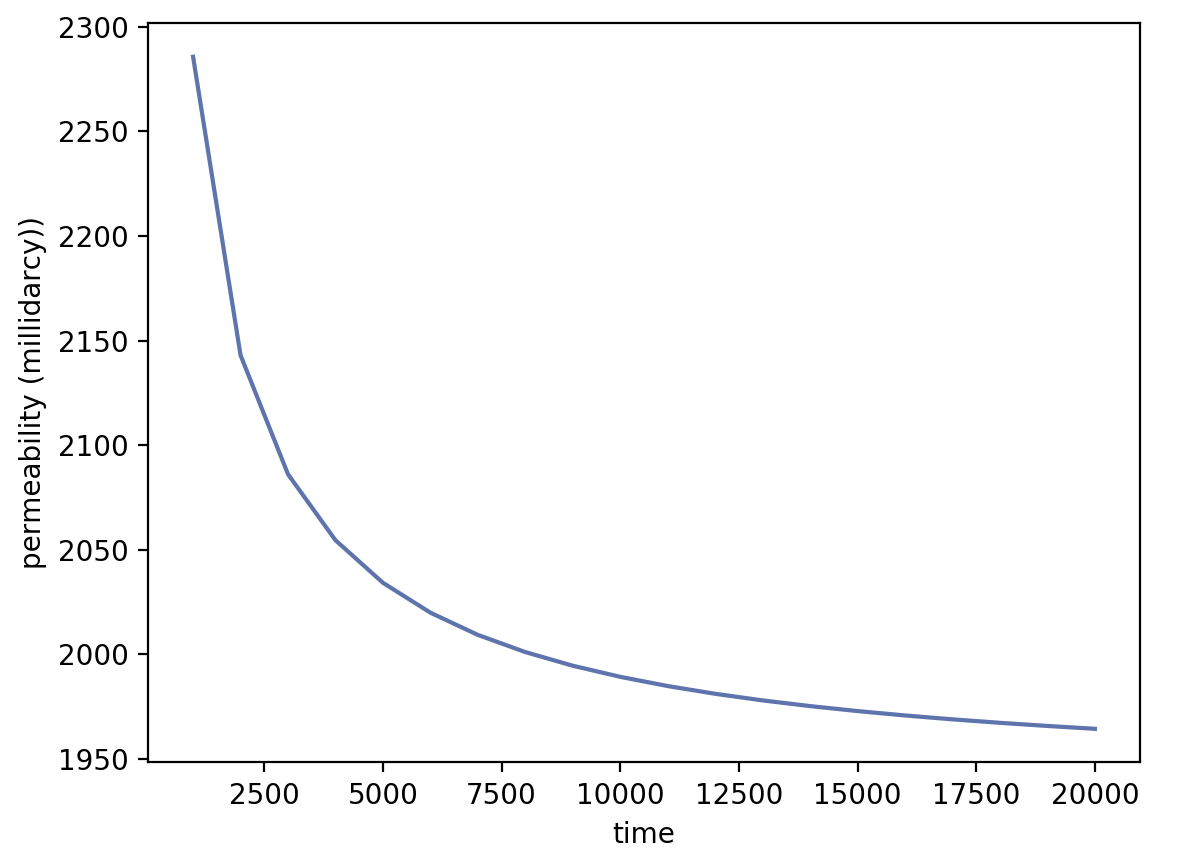
Based on this, we can see that the permeability is still drifting, and has not completely reached steady state. We might elect to re-run the simulation, specifying a
larger number of maximum timesteps using timestepMax and lower tolerance.
Note: larger images will require larger numbers of timesteps to reach steady-state
Benchmark Cases
|
|
|